
How to Combine Criteria for More Accurate Search
How you combine criteria in TalentRiver has a big impact on the candidate profiles you surface. Use OR logic to broaden your search, and AND logic to narrow it.
This guide explains how it works - and how to use it to find the right profiles faster.
Broaden your search with multiple criteria in the same box
When you add several criteria in the same box, TalentRiver treats them as alternatives.
This uses OR logic:
Candidates match if they meet any of the criteria in that box.
Use this when you want to:
Broaden your search
Stay flexible on skills, backgrounds, or experience
Explore similar or related profiles
Example for Broaden Your Search
You add Sales and Marketing in the same box.
TalentRiver will show candidates with Sales OR Marketing experience.
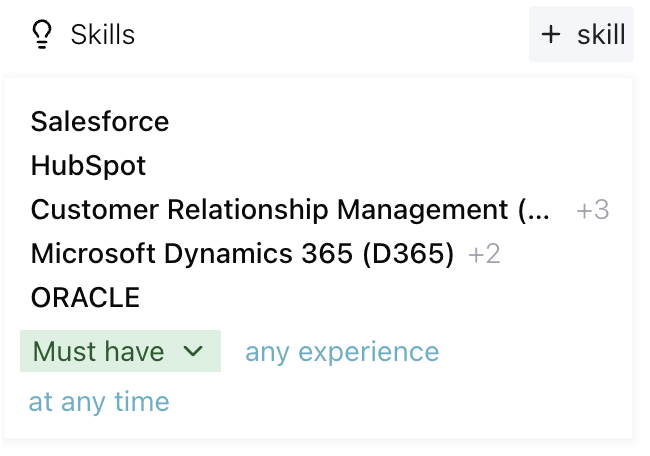
This is the fastest way to widen your talent pool.
Narrow your search with criteria in separate boxes
When you place criteria in separate boxes, TalentRiver treats them as combined requirements.
This uses AND logic:
Candidates match only if they meet all the criteria across those boxes.
Use this when you want to:
Combine multiple distinct requirements
Target very specific profiles
Filter candidates with higher precision
Example Narrow Your Search
You put B2B in one box and HubSpot (CRM) in another. TalentRiver will show candidates with B2B AND HubSpot (CRM) experience.
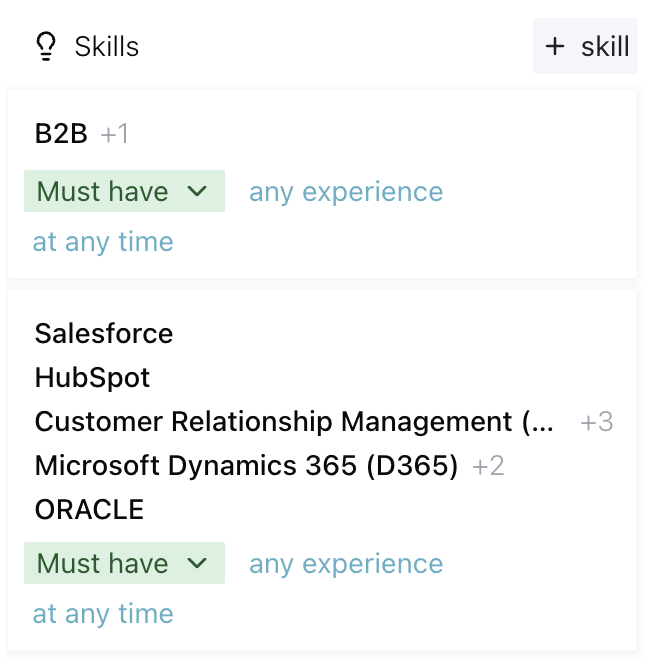
This helps you pinpoint the exact profiles you need.
Tips for Better Results
Start broad, then narrow down. Begin with OR logic to explore your options, then refine with AND logic.
Mix and match. You can use both logics together to shape your search.
Stay flexible. Slight adjustments can unlock new pools of qualified candidates.