
Attach a search to a project or ATS job
After you describe a role, TalentRiver asks you to put the search somewhere useful. That step is not a folder picker — it ties the search to a project so your pipeline can stay synced and you can later send candidates into the right place.
Why this step matters
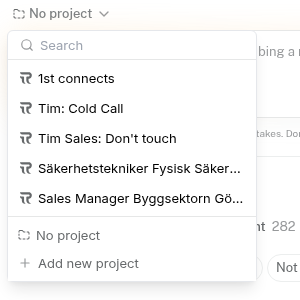
You’ll see Choose a project to continue, with two options: + New project and Existing project.
Searches and candidate lists live on projects. When the project is also a job in your ATS, attaching early means ranked people, shortlists, and later exports stay connected to the same role — not stranded in a one-off search.
Tip: Attach before you go deep on search depth. Fixing the project later is more work than picking the right one once.
Choose Existing project when the role already exists
Use Existing project when:
You already have this role open as a TalentRiver project, or
The job already exists in your connected ATS
Both count as an existing project in the picker. You’re choosing the container that owns the pipeline for this hire — not inventing a parallel copy.
TalentRiver works with the ATSs you connect (for example Teamtailor, Ponty, Invenias, and others). Name the ATS job / project, not one vendor — the product is built to work across the ATSs your workspace uses.
Tip: Search the picker by job title or client name. Recruiters often have many open roles; a quick filter beats scrolling.
What attaching does for your pipeline
The search opens on that project’s Agents workspace.
It appears alongside the other work already on that role.
You can keep reviewing and shortlisting in TalentRiver.
When you’re ready, you can send people into the same ATS job you attached to — instead of hunting for the right job later.
Tip: If several people on your team work the same role, attach to the shared project. Everyone then sees the same agent search and shortlist context.
When to use + New project
Choose + New project only when you truly need a new container — for example a brand-new role that does not exist in TalentRiver or your ATS yet.
If the job is already live in your connected ATS, prefer Existing project. Creating a duplicate makes sync and export harder later.
Tip: Unsure? Check your ATS first. If the job is there, refresh in TalentRiver and pick it as Existing project rather than starting fresh.
Missing an ATS job in the list?
If the job you need is not in the picker:
Do not create a lookalike TalentRiver project just to move on.
Refresh or reconnect so TalentRiver can see the ATS job.
Come back and attach with Existing project.
Tip: Missing jobs are usually a sync timing issue, not a reason to abandon the Agents search you already started.
After you attach
You’ll choose how thorough the first search should be, then review a ranked pool. Saving people puts them on the Shortlist for this project. When you’re ready to push into the ATS, use the send-to-ATS flow on the project you attached.
Tip: Keep one search per live role when you can. Extra parallel searches on the same hire create noise for the next person who opens the project.